vscode调试torch.distributed.launch
在PyTorch中,如果我们要运行一个分布式的程序会用到以下命令
1 python -m torch.distributed.launch --nproc_per_node 8 train.py
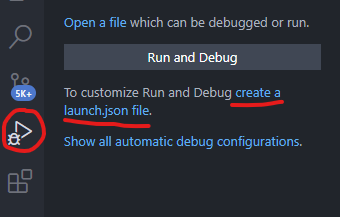
但是如果我们想调试的时候如果使用命令行调试就会很麻烦,这里我们需要用到vscode的launch.json调试方法,首先我们打开vscode,看一下文件目录下有没有.vscode目录,如果有看一下里面有没有launch.json文件,如果没有我们需要新建一下,如下所示,依次点击
然后选择相应的python调试文件即可,此时会生成一个launch.json文件,内容如下所示
1
2
3
4
5
6
7
8
9
10
11
12
13
14
15
{ // Use IntelliSense to learn about possible attributes. // Hover to view descriptions of existing attributes. // For more information, visit: https://go.microsoft.com/fwlink/?linkid=830387 "version": "0.2.0", "configurations": [ { "name": "Python: Current File", "type": "python", "request": "launch", "program": "${file}", "console": "integratedTerminal" } ] }
然后我们将其进行修改,注意这里采用单卡调试,也就是说我们的调试要达到一下命令的效果
python -m torch.distributed.launch --nproc_per_node 1 train.py
下面是修改后的文件,其中program是我们要运行的文件,就是launch.py ,然后-m参数忽略即可,args重视我们后续的参数,有–nproc_per_node 1以及train.py
1
2
3
4
5
6
7
8
9
10
11
12
13
14
15
16
17
18
19
20
{ // Use IntelliSense to learn about possible attributes. // Hover to view descriptions of existing attributes. // For more information, visit: https://go.microsoft.com/fwlink/?linkid=830387 "version": "0.2.0", "configurations": [ { "name": "Python: 当前文件", "type": "python", "request": "launch", "program": "/home/wangyh/anaconda3/envs/torch/lib/python3.6/site-packages/torch/distributed/launch.py", "console": "integratedTerminal", "args": [ "--nproc_per_node=1", "train.py", ], "env": {"CUDA_VISIBLE_DEVICES":"0"}, } ] }
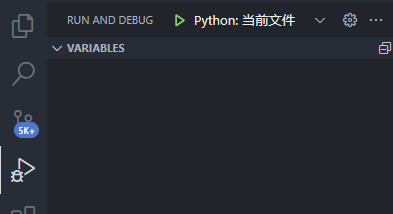
注意:调试的时候点击下面图片的绿色三角才能进行调试!!!!!!如果点击插件run中的debug in terminal是不能进行调试的!!!好了到这里就可以开心的调试啦