gr.Slider
创建一个slider bar,即一个可以通过滑动控制的数值
1
2
3
4
5
6
7
8
9
10
11
12
13
import gradio as grdef slide (input return input demo = gr.Interface( slide, [gr.Slider(2 , 20 , value=4 , label="Count" , info="Choose betwen 2 and 20" ),], gr.Number(), ) if __name__ == "__main__" : demo.launch()
其中第一和第二个数字分别最大和最小值,value是默认值,label是标题,info是详细信息
gr.dropdown
创建一个有下拉菜单的选项卡
1
2
3
4
5
6
7
8
9
10
11
12
13
import gradio as grdef drop (animal ): return animal demo = gr.Interface( drop, [gr.Dropdown(["cat" , "dog" , "bird" ], multiselect=False , label="Animal" , info="Will add more animals later!" ),], "text" , ) if __name__ == "__main__" : demo.launch()
如图,下拉选项可以选择cat,dog和bird,右边输出str类型的文本
如果将上面的multiselect变为True,则可以选择多个选项,如下
gr.CheckboxGroup
此操作和dropdown类似,但是不是下拉菜单了,而是将选项直接展示出来,用户可以根据需要打钩
1
2
3
4
5
6
7
8
9
10
11
12
13
14
import gradio as grdef checkboxgroup (country ): return country demo = gr.Interface( checkboxgroup, [gr.CheckboxGroup(["USA" , "Japan" , "Pakistan" ], label="Countries" , info="Where are they from?" ),], "text" , ) if __name__ == "__main__" : demo.launch()
此函数不需要定义multiselect参数就可以进行多个选择
gr.Radio
此函数和上述checkboxgroup类似,只不过将打钩变成了点
1
2
3
4
5
6
7
8
9
10
11
12
13
14
import gradio as grdef radio (local_ ): return local_ demo = gr.Interface( radio, [gr.Radio(["park" , "zoo" , "road" ], label="Location" , info="Where did they go?" ),], "text" , ) if __name__ == "__main__" : demo.launch()
update
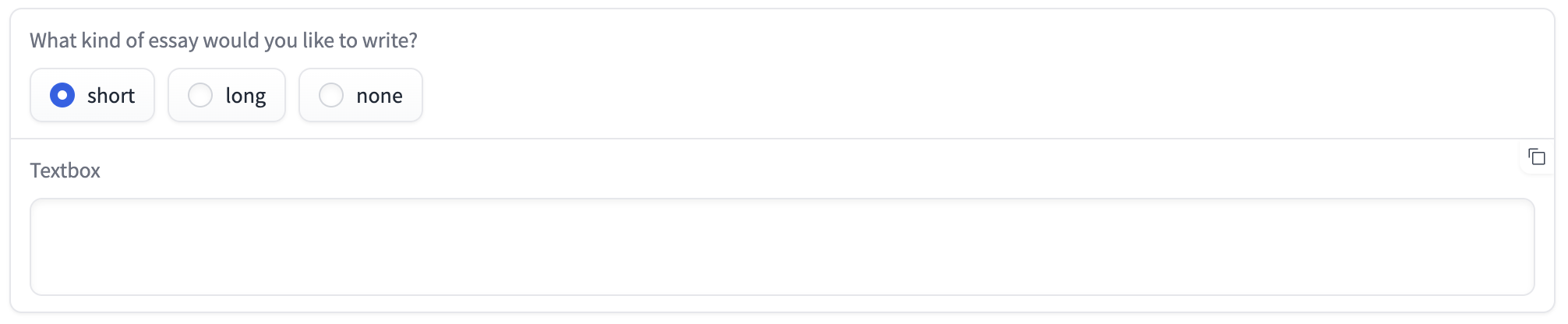
update用来更新当前操作(例如文本,图片等),例如根据一些判断来调整文本框的大小
1
2
3
4
5
6
7
8
9
10
11
12
13
14
15
16
17
18
19
20
import gradio as grdef change_textbox (choice ): if choice == "short" : return gr.Textbox.update(lines=2 , visible=True ) elif choice == "long" : return gr.Textbox.update(lines=8 , visible=True ) else : return gr.Textbox.update(visible=False ) with gr.Blocks() as demo: radio = gr.Radio(["short" , "long" , "none" ], label="What kind of essay would you like to write?" ) text = gr.Textbox(lines=2 , interactive=True ).style(show_copy_button=True ) radio.change(fn=change_textbox, inputs=radio, outputs=text) if __name__ == "__main__" : demo.launch()
下面根据用户选择,会实时更新文本框的大小